
Download Simple Weight Tracker – weight tracker, BMI calculator, body fat percentage, health tracker, fitness app, weight loss, daily weight log, progress tracker
Overview
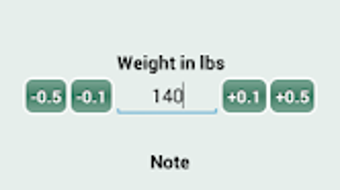
Simple Weight Tracker is a lightweight Android application designed to help users monitor their weight over time with minimal effort. The app provides a straightforward interface for recording daily weight entries, including the date and corresponding weight value. Users can optionally add notes to each entry, allowing for personalized tracking of lifestyle factors such as diet, exercise, or mood.
This functionality supports users aiming to understand the relationship between their habits and weight fluctuations. The app is particularly suited for individuals focused on weight loss, maintaining a healthy weight, or simply tracking personal health progress. Developed by NUTRITION apps, the application emphasizes simplicity and accessibility, making it ideal for users who prefer no-frills tools without complex features.
Real-world usage scenarios include daily check-ins during a fitness journey, monitoring post-workout changes, or maintaining consistency in long-term health goals. The app does not include advanced analytics or integration with wearable devices, focusing instead on core tracking functionality.
Key Features & Capabilities
- Daily Weight Logging – Users can record their weight with a simple tap, automatically timestamped with the date. This enables consistent data collection without requiring detailed setup.
- Notes Integration – Each weight entry can be accompanied by custom notes, allowing users to document context such as meals consumed, physical activity, or energy levels.
- Historical Data Display – A chronological list of all recorded weights is available, providing a clear view of past entries and progress over time.
- Graphing Functionality – The app visualizes weight trends through a built-in graph, helping users identify patterns such as gradual loss, plateaus, or fluctuations.
- BMI and Body Fat Percentage Calculation – Based on input weight and optional height and body fat data, the app computes BMI and estimated body fat percentage for health insights.
- Unit System Flexibility – Supports both metric (kg, cm) and imperial (lbs, in) measurement systems, accommodating user preferences across regions.
These features support practical use cases such as tracking weight changes during a diet, evaluating the effectiveness of a workout routine, or maintaining accountability in a personal wellness plan. The absence of in-app purchases or advertisements aligns with its goal of providing a distraction-free experience.
User Interface, Workflow & Performance
The user interface of Simple Weight Tracker is designed with minimalism in mind, prioritizing ease of access to core functions. Navigation is intuitive, with main actions like logging weight and viewing history presented on the home screen. The workflow follows a linear path: record → save → review, reducing cognitive load and enabling quick data entry.
Users can access their full history and graph with a single tap, streamlining progress review. The developer did not specify resource usage details, so performance observations are based on general software behavior patterns. The app is expected to operate efficiently on modern Android devices, given its small size of 4.5 MB.
Stability is assumed to be consistent with standard lightweight applications, though real-world performance may vary depending on device capabilities. The app does not require constant background activity, minimizing battery consumption. No data synchronization or cloud backup is mentioned, suggesting all records are stored locally on the device.
Compatibility & System Requirements
Simple Weight Tracker is compatible with Android operating systems, though specific version requirements were not provided. The application has a file size of 4.5 MB, indicating it is optimized for low-storage environments. The developer did not specify minimum hardware requirements such as RAM or CPU, so exact system compatibility cannot be confirmed.
Users should ensure their device runs a recent version of Android to avoid potential compatibility issues. Installation is straightforward, and the app does not require additional software or drivers. Platform compatibility information is limited, and no details were given about support for tablets, wearables, or other form factors.
The absence of cloud integration suggests data remains confined to the device where it was recorded.
Pros and Cons
Pros
- Free to download and use with no in-app purchases or ads
- Simple, intuitive interface ideal for beginners and non-tech users
- Supports both metric and imperial measurement units
- Includes BMI and body fat percentage calculations for health insights
- Visual graphing helps identify long-term weight trends
- Lightweight at only 4.5 MB in size
Cons
- No cloud backup or synchronization across devices
- Historical data cannot be exported or shared externally
- Exact system requirements were not listed
- Does not integrate with fitness trackers or health platforms
- Only available on Android, limiting cross-platform access
FAQ Section
Is Simple Weight Tracker available for iOS devices?
The app is currently only available for Android. No information was provided about future availability on iOS.
Can I back up my weight data?
There is no built-in cloud backup or export feature. All data is stored locally on the device where the app is installed.
Does the app require an internet connection?
Basic functionality such as logging and viewing data can be used offline. However, some features like BMI calculation may require user input but do not depend on an active connection.
Is the app safe to use?
As a free Android application developed by NUTRITION apps, it does not include known security risks. However, users should download it from official app stores to ensure authenticity.
How often should I update the app?
Updates are recommended when available to ensure compatibility and security. The developer has not specified a release schedule for updates.
Final Thoughts
Simple Weight Tracker delivers a focused, no-nonsense approach to personal health monitoring. Its clean design, essential features, and lack of advertisements make it a compelling choice for users seeking a reliable daily weight log. While it lacks advanced integrations and cross-device access, its core functionality is well-executed and efficient.
The inclusion of BMI and body fat percentage calculations adds value beyond simple tracking. This app is best suited for individuals who prioritize simplicity and privacy in their health journey. For those using Android and looking for a free, lightweight tool to monitor weight progress, this application offers a solid foundation.
Download Simple Weight Tracker now.







